

When you promote a new domain controller and those familiar SYSVOL and NETLOGON shares are missing, it’s more than annoying. It’s a sign something’s out of sync.
We recently ran into this issue during a client deployment on Server 2019, and the fix was surprisingly simple (once we stopped overthinking it).
This quick guide walks you through how to get those missing folders back with solutions that work from Server 2012 R2 onwards
Step 1: Fix SYSVOL Missing on New Domain Controller
Start here if you’ve promoted your DC but \\DC\SYSVOL comes up empty.
-
Log in to the affected domain controller
-
Open the Registry Editor (
regedit) -
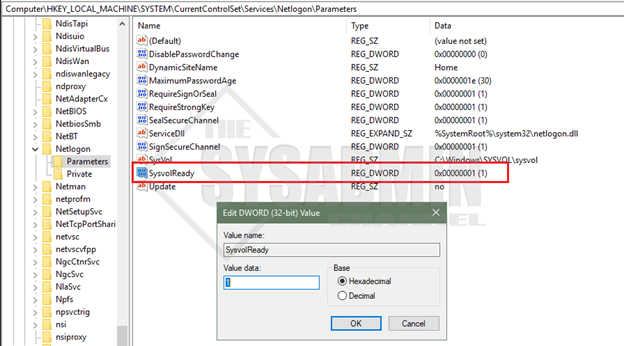
Navigate to this key:
HKEY_LOCAL_MACHINE\SYSTEM\CurrentControlSet\Services\Netlogon\Parameters -
Find
SysVolReadyand change the value from0to1
That’s it. Once that change is in place, the SYSVOL share should populate. Test it by typing \\YourDCName\SYSVOL in the Run window or File Explorer.
Step 2: Bring Back the NETLOGON Share
If NETLOGON is still MIA, there’s one more thing to check:
-
Stay logged into your domain controller
-
Head to
C:\Windows\SYSVOL\domain -
Create a new folder named
scripts(if it doesn’t exist) -
Restart the Netlogon service (or reboot the server if that’s easier)
Once that’s done, \\DC\NETLOGON should be back in action.
Need Help With Replication or Domain Health?
If these steps don’t work — or if replication is also acting up — it could be a sign of deeper domain controller issues. Here’s a useful YouTube video on fixing replication that can help with more advanced troubleshooting.
Or better yet, get in touch. We handle this kind of thing all the time for SMBs across Denver. Whether it’s cleaning up Active Directory or setting up a fresh domain from scratch, we’re here to make tech one less thing to worry about. We offer network consulting services that cover everything from design to disaster recovery.
Want Help From a Human?
This blog is one of many in our Knowledge Base, but if you’d rather not troubleshoot registry keys solo, give us a shout.